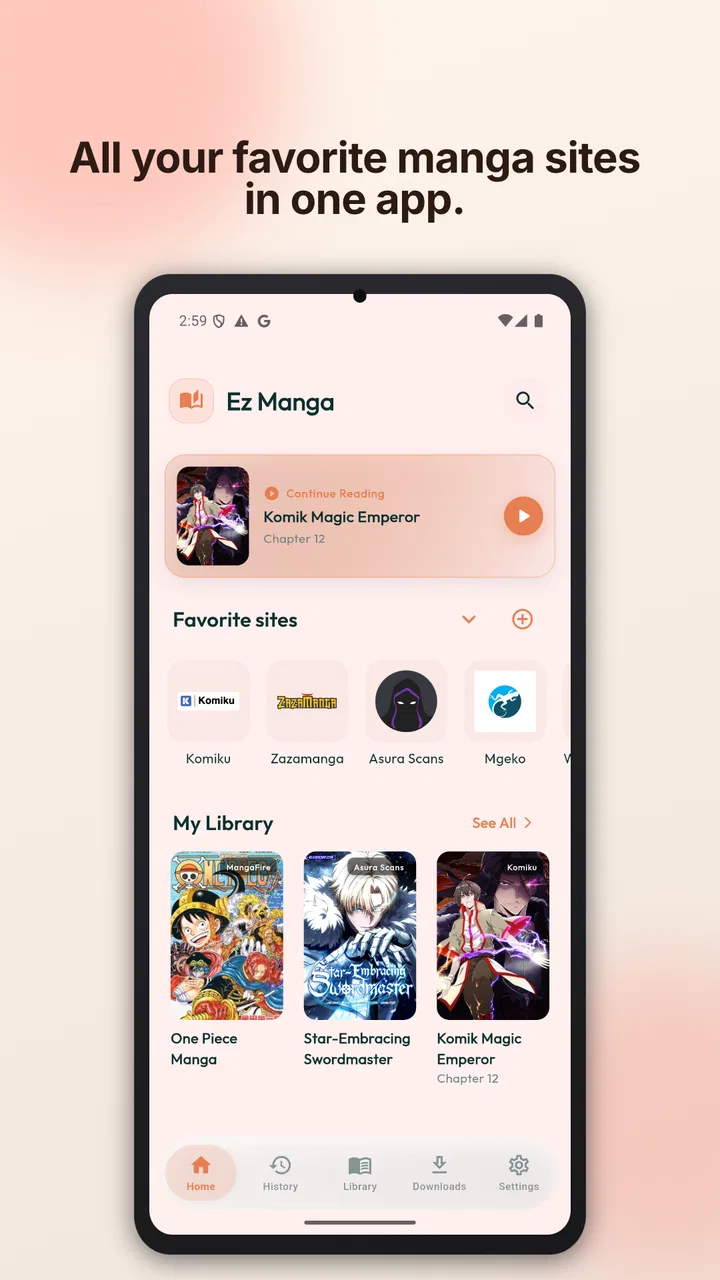
EZ Manga: Webtoon & Manhwa
- 3.4
- Rating
- 10.00K
- Installs
- Free
- Price

 Analysis by App-foxy
I spend a lot of time reading comics on my phone, so I tend to judge a reader by the small moments: how quickly I can get back to a chapter, whether the page is comfortable to read one-handed, and how much effort it takes to keep track of several series. EZ Manga: Webtoon & Manhwa is aimed at exactly that routine. It is a free comics app from EZ Apps Studio, designed to browse manga and webtoons while offering a reader-focused way to move through chapters and keep reading across devices.
My first impression is that this is more useful as a personal reading hub than as a destination for people expecting a huge, fully managed comics subscription service. Its appeal comes from putting browsing, reading mode, and synchronization in one place. That combination can make casual reading less scattered, especially if you normally jump between browser tabs, saved pages, and separate reading apps.
The app is marked Mature 17+, which is important before installing it on a shared device or recommending it to a younger reader. It is free to download, although optional purchases range from $2.99 to $69.99 per item. I would treat those purchases as something to inspect carefully rather than assuming every part of the experience is included at no cost.
You May Also Like

 Blood Strike: 2.5 Anniversary
Blood Strike’s Loadouts Turn Every Drop Into a Tactical Gamble
A close look at Blood Strike’s custom loadouts: how fast access to signature weapons reshapes its battle royale rhythm, rewards preparation, and narrows the gap between fights.

 Pandora - Music & Podcasts
Pandora’s Music Is Easy to Start, but Harder to Recover
Pandora’s strength is its low-effort path from a seed to a station. Its weak spot is how much confidence it asks you to place in connection, setup, and quiet recovery.

 8 Ball Pool
8 Ball Pool Is Built on Rivalries, Rematches, and Routine
A close look at the rivalries, rematches, shared routines, and unanswered safety questions that turn a quick pool match into a persistent mobile community.

 Samsung Music
Samsung Music’s Quiet Strength Is Playing What You Already Own
Its reach comes less from spectacle than from dependable access to a personal library. That simplicity is both the app’s strongest retention engine and its ceiling.

 AccuWeather: Weather Radar
AccuWeather Review: A Quick, Clear Forecast for Everyday Decisions
For everyday plans, the best forecast is the one you can understand quickly. AccuWeather makes rain timing, radar, and local conditions easy to act on, with a few trade-offs.

 Hill Climb Racing
Why Hill Climb Racing Still Turns Crashes Into One More Run
A tiny car, a bumpy hill and one more upgrade: Hill Climb Racing keeps resurfacing because its simple chaos makes every near-miss feel personal.
More From Our News Desk



How EZ Manga feels in its current state
I find that a shared phone changes what matters in a comics reader: a convenient resume point is useful, but it should not blur the line between one person’s reading and another’s. In this section, I focus on how I would keep a household routine organized around EZ Manga’s browsing and sync approach, then turn to the practical boundaries that make shared use more comfortable.
A focused browser rather than a traditional comic store
The strongest idea here is the combination of a manga and webtoon browser with a dedicated reading mode. In practice, that makes the app feel closer to a reading workspace than a conventional storefront. You can use it when you already know what you want to read, but it also makes sense when you are browsing for something new and want to move from discovery into reading without changing tools.
That distinction matters. A typical comic platform usually centers its own catalog, account system, and commercial reading model. EZ Manga is more appealing to readers who want a flexible way to organize their reading activity. I found that approach less restrictive during casual browsing, because the app’s value is not tied only to a single series or publisher. At the same time, flexibility can mean that the experience feels less polished than a service built around one carefully controlled library.
The reader mode is particularly relevant for phone users. Manga pages and vertical webtoons do not always behave well inside a normal browser window. A reader-oriented view can reduce the visual clutter around the page and make it easier to concentrate on panels. For a quick session during a commute or while waiting for an appointment, that focused presentation is more comfortable than reading through a busy webpage.
Where synchronization becomes genuinely useful
Synchronization is not the kind of feature people notice when everything is going well, but it becomes valuable as soon as reading moves between devices. I might begin a chapter on a phone, continue on a tablet at home, and later return to the phone. A synchronized reading position can remove the annoying search for the last page or episode.
There is also a less obvious benefit: sync can act as a memory aid. If you follow several long-running series, it is easy to remember the story but forget exactly where you stopped. Keeping that progress connected gives the app a practical role beyond simply displaying pages. I would still make a habit of checking that progress has updated before switching devices, especially after a short reading session or when the connection is unreliable.
Readers who prefer to keep everything local may see synchronization differently. It introduces an account-based step and makes the experience dependent on progress being stored correctly. If you only read one title on one device, the feature may not change much. If you regularly alternate between screens, it is one of the clearest reasons to try this app instead of relying on ordinary browser bookmarks.
Its place in the wider comics category
EZ Manga sits in the comics category, but it does not feel identical to a digital bookstore or a publisher-specific app. Those alternatives can be better when you want official ownership records, a clearly defined catalog, or a tightly integrated purchase history. A general browser and reader can be better when you want to move between different reading sources and keep your routine in one interface.
That trade-off is the key to understanding the app. It may suit someone who values convenience and continuity more than a single branded library. It is less suitable for a reader who wants every title, translation, release schedule, and purchase handled inside one authoritative service. I would also look elsewhere if my main priority were offline access, because a browser-centered workflow is not automatically the same as downloading a complete library for travel.
What the current numbers suggest
The app has an average rating of 3.4 from around 65 ratings, with four written reviews, and it has passed 10K+ installs. I read those figures as a sign of an early, still-forming product rather than a mature standard that has already satisfied a very broad audience. The rating is not low enough to dismiss the idea, but it does suggest that individual expectations may vary.
Its current version is 1.0.50, while the app requires Android 7.0 or later. That makes it accessible to many older Android devices, which is helpful for readers who do not upgrade their phone frequently. The version number also gives the app room to evolve. I would not assume that today’s behavior represents the final shape of the product, particularly when the overall user base is still relatively modest.
What the release and version details mean for users
Because EZ Manga is rated Mature 17+, I would treat it as an adult-oriented app rather than a general family reading space. Here I look at simple ways to separate accounts, purchases, and reading habits without assuming the app offers family controls, before considering how household members can coordinate without stepping on one another’s progress.
A recent product with room to settle
EZ Manga was released on March 27, 2026, so I approach it as a comparatively new app. That context changes how I judge it. A new reader can already be useful, but it may still be refining navigation, source handling, synchronization behavior, and the balance between free access and optional purchases.
The current version, 1.0.50, shows that the app is not frozen at its initial release. I see that as encouraging because active iteration is especially important for a browser-based reading tool. Web pages change, layouts vary, and reading workflows need regular adjustments. A product in this category benefits from developers who respond to those changes rather than treating the first release as finished.
However, a version update alone does not tell me that every rough edge has disappeared. I would expect existing users to notice gradual improvements rather than a completely transformed experience. If you installed an earlier build, the most meaningful question is not simply whether the version number moved forward, but whether your everyday tasks—finding a title, opening a chapter, restoring progress, and reading comfortably—feel more dependable.
How existing users should approach an update
If you are already using the app, I recommend testing synchronization with a short chapter before trusting it with several unfinished series. Read a few pages, leave the app normally, and then check the same title from another device or after reopening it. This is a simple workflow, but it exposes whether your personal reading habit matches the way the app records progress.
I would also keep a small note of the chapters you are following during the early stages of use. That is not something most people want to do permanently, but it gives you a backup while you decide whether the app’s progress handling is reliable enough for your library. The tip is especially useful if you read many titles irregularly, because a missed position can be difficult to reconstruct later.
Another practical habit is to separate discovery from commitment. Browse new series in the app first, but do not immediately build your entire reading routine around it. Try a few different formats: a standard page-based manga chapter, a long vertical webtoon, and a title you pause and resume on another day. Those tests reveal more than a single uninterrupted session because they cover the situations where browsing and synchronization matter most.
The effect of free access and in-app purchases
The free price makes experimentation easy. I can install the app, explore its reading workflow, and decide whether its organization suits me without paying at the door. That is a meaningful advantage over services that require a subscription before their central features become useful.
Still, optional purchases between $2.99 and $69.99 per item create a wide range of possible spending. I would not treat “free” as a promise that every reading path will remain free. Before confirming a purchase, I would check exactly what it unlocks and whether it is a one-time benefit or part of a broader reading arrangement. This is particularly important for families sharing payment methods, since the Mature 17+ rating already makes the app unsuitable for assuming a child-safe environment.
The purchase model may work for readers who want to pay selectively, but it can be less comfortable for anyone who prefers one predictable monthly cost. A dedicated subscription service may be easier to budget, while EZ Manga may appeal more to someone who wants to start without a recurring commitment. Neither approach is universally better; the right choice depends on whether control over individual spending matters more to you than a fixed, familiar plan.
A realistic everyday reading routine
Imagine starting a webtoon during a lunch break. You browse for a few minutes, open a chapter in reader mode, and read until work calls you back. Later, you continue from a tablet at home. In that situation, the app’s value is not just that it displays the comic. It reduces the number of steps between finding the title, reading it in a cleaner view, and returning to the same point later.
Now imagine a different routine: you are taking a long flight and want a large offline collection, or you only read comics from one publisher and want guaranteed access to that publisher’s complete catalog. In those cases, a purpose-built official service may be the better option. EZ Manga’s browser-and-sync approach is most convincing for flexible, connected reading, not for every possible form of comic ownership or travel reading.
Remaining gaps I would keep in mind
The first gap is clarity around the boundary between browsing and reading access. A smooth reader interface can make an app feel complete, but the quality of the overall experience still depends on how consistently titles can be found and opened. If you expect a single, perfectly organized catalog, you may find a general browsing model less predictable than a publisher’s own application.
The second gap is the difference between synchronization and backup. Syncing a reading position across devices is useful, but it should not be confused with preserving every preference, saved item, or reading history forever. I would use the feature for convenience while keeping realistic expectations about what happens if you change devices, sign out, or alter your reading setup.
The third gap is maturity. With an average rating of 3.4 and a relatively small number of user ratings, there is not yet a large public track record to rely on. That does not prove the app is unreliable, but it means I would evaluate it through my own routine rather than assuming that a popular alternative has already solved more edge cases.
There is also a content-safety consideration. The Mature 17+ label means I would not install it casually on a child’s device or recommend it to a younger family member simply because the app is free. Adults should also remember that the label describes the intended age level, not a guarantee that every individual title will match their personal preferences.
Who should try it, and who should skip it
I would recommend giving EZ Manga a try if you read both manga and webtoons, switch between devices, and want a reader mode that feels more deliberate than a normal mobile browser. It is also a reasonable choice for someone who wants to explore a free app before deciding whether a paid reading service is worth the commitment.
I would be more cautious if your priority is a fully official, publisher-controlled library, dependable offline reading, or a simple all-you-can-read subscription. In those cases, the usual specialized alternatives may provide clearer expectations. I would also skip it for a younger reader because of the Mature 17+ age rating, regardless of the free download.
What I would watch as the app develops
The most important future signal is whether updates make the core loop more dependable: browse, open, read, pause, and resume. That is more meaningful to me than cosmetic changes. I would watch for improvements that make progress recovery clearer, reduce friction when moving between manga pages and vertical webtoons, and explain purchase-related choices before a user commits.
I would also pay attention to how EZ Apps Studio responds to the needs of its early audience. Four written reviews are not enough to map every strength and weakness, but they show that the public conversation is still small. As more readers use the app, feedback should reveal whether the current rating reflects temporary roughness or a more fundamental mismatch between the app’s flexible browsing model and what readers expect from a comics service.
For now, I see the app as a promising reading companion rather than a complete replacement for every comics platform. Its combination of browsing, reader mode, and synchronization solves a real everyday problem, especially for people who read across devices. The best reason to install it is convenience between sessions, not the assumption that it replaces a full official catalog.
My recommendation is to try it with a small set of titles and test the resume workflow before moving your entire reading list. That approach lets you benefit from its strongest idea while keeping your expectations sensible. EZ Manga: Webtoon & Manhwa is free to start, supports older Android versions from 7.0 onward, and is being developed as a young product. If its current direction continues to improve the practical details, it could become a useful home for flexible manga and webtoon reading; if you need certainty, offline depth, or a tightly controlled catalog today, another option will probably suit you better.
FAQs for EZ Manga: Webtoon & Manhwa
01What is EZ Manga: Webtoon & Manhwa?
EZ Manga: Webtoon & Manhwa is a mobile reading app designed for fans of digital comics, including manga, manhwa, and webtoons. It brings series and chapters together in a phone-friendly interface, allowing readers to browse titles, discover new stories, and continue reading from their device. The available catalog, languages, and reading options may vary depending on the app version and region.
02Is EZ Manga: Webtoon & Manhwa free to download and use?
The application may be available to download at no initial cost, but free access does not always mean that every feature or chapter is completely free. Some content can include advertising, optional purchases, subscriptions, or other access restrictions. Before downloading or making a payment, readers should check the current store listing, in-app pricing, and terms to understand how premium chapters and additional features are handled.
03Does EZ Manga: Webtoon & Manhwa offer manga and manhwa in English?
The app is intended for readers interested in manga, manhwa, and webtoon-style comics, but language availability can differ between titles. Some series may be offered in English while others may depend on translations supplied through the service. It is worth checking the description, search filters, and individual series information before starting a title, especially if English translation quality and consistency are important to your reading experience.
04Can I read comics offline with EZ Manga: Webtoon & Manhwa?
Offline reading depends on the features supported by the current version of EZ Manga: Webtoon & Manhwa and on the licensing rules for each title. If download functionality is available, chapters may need to be saved while connected to the internet and could remain accessible only inside the app. Users should also review storage requirements, download limits, and whether saved chapters expire or require periodic online verification.
05Is EZ Manga: Webtoon & Manhwa safe for children and suitable for all ages?
Not necessarily. Manga, manhwa, and webtoons can cover a wide range of subjects, including violence, romance, mature themes, strong language, or sexual content. The suitability of the app depends on the individual titles available in its catalog and the age ratings shown in the store or within the service. Parents should review content descriptions, use device controls where appropriate, and avoid assuming that every series is family-friendly.
Pros
- Large catalog of manga
- manhwa
- and webtoons in one app
- Clean reader layout makes long reading sessions comfortable
- New chapters are added regularly across popular series
- Bookmarks help you quickly return to unfinished titles
- Supports multiple reading modes for different preferences
Cons
- Some titles or chapters may be unavailable in certain regions
- Free access can include ads or limits on selected content
- Translation quality may vary between different series
- Offline reading options may be limited for some chapters
- The extensive catalog can make finding specific titles difficult

EZ Manga: Webtoon & Manhwa
Gallery